PwC · Software & Product Innovation · 2025–2026
Designing the human layer of an
enterprise AI ecosystem
PwC's 300,000+ employees were navigating a rapidly expanding ecosystem of AI tools, agents, resources, and work systems. As one of three product designers, I helped turn that complexity into experiences people could discover, understand, access, and act on.
My role: One of three product designers across the ecosystem. I owned end-to-end design for unified search and discovery, access and provisioning, and global governance/admin, while contributing across Store, AI Coaches, adoption experiences, and Copilot.
The problem
More AI didn't make AI easier to use
As PwC's AI ecosystem grew from essentially zero to more than 100 capabilities, employees increasingly struggled with orientation. Across research, two versions of the same question kept appearing: What should I use? and What should I do next? The challenge was not exposing more information. It was narrowing complexity around the user's intent.
Research → product decisions
Design around intent, not the org chart
We learned
People started with a need, not a product name
So we designed
Move discovery toward intent-based search and recommendations instead of expecting users to know which product or destination to open.
We learned
Unclear access stopped people from moving forward
So we designed
Surface availability and the request path early instead of letting governance appear only after someone chose a tool.
We learned
AI confidence varied across roles and experience levels
So we designed
Combine AI guidance with inspectable results, clear categories, and human support rather than assuming an AI-only interaction worked for everyone.
Product principle
Start with what someone is trying to accomplish, then reveal the most relevant path, whether that is a tool, resource, person, or next action.
AI Tool Guide
One front door into a growing AI ecosystem
Tool Guide evolved from a discovery surface into the connective layer across PwC's AI ecosystem: browsing, search, access, coaching, adoption, and governance.

Ecosystem
Making new AI capabilities understandable
Store introduced agents, MCPs, plug-ins, skills, and other resources that many employees had never encountered before. We designed taxonomy, compatibility cues, and progressive detail so technical resources could still be understood by a broad enterprise audience.

Discovery
Start with a need, not a product name
I owned unified search and discovery, including how user intent mapped across tools, Store resources, skills, connectors, agents, events, and coaches. The goal was to let people describe what they needed without first understanding the architecture behind the ecosystem.
Explored direction
Categorized search results

Early concepts behaved more like traditional search, separating tools and coaches into browsable result groups. This made the system easy to inspect, but left users to interpret which result was actually best for their need.
Design decision
AI answer or traditional search results?
We debated replacing traditional search with an AI concierge. I pushed for a hybrid: let AI synthesize intent and recommend a path forward, while keeping categorized results inspectable underneath. This preserved user control and gave filtering, resource types, and navigation a clear role.
Shipped direction

Access
Turning enterprise permissions into a clear workflow
I owned the end-to-end access and provisioning experience. Eligibility could depend on tool, role, line of service, territory, approver, and business justification, so the design challenge was hiding operational complexity without hiding what users needed to know.

Design decision
Concierge chat or structured request?
A conversational request felt lighter, but approvals required consistent, auditable information. We kept required inputs structured and focused the experience on editable context, transparency, and a clear review step rather than hiding the workflow behind chat.
Governance
Taking a local product global
I owned the global admin experience as Tool Guide expanded from local rollout to the US and then globally. I mapped the relationships between global admins, territory admins, and approvers so governance could scale without creating a separate product for each persona.

Connecting governance back to access
The same request employees submitted needed to give approvers enough context to make a decision quickly while preserving a clear governance trail.

Design decision
Separate admin products or one permissioned system?
Global admins, territory admins, and approvers needed different levels of control, but separate experiences would fragment governance. I designed the hierarchy so permissions changed what each persona could see and act on, while global admins could operate across lower levels when needed.
Adoption
Access wasn't the same as adoption
I also designed AI Coaches, connecting employees with people who could help based on tool expertise, role, office, and line of service. Usage benchmarking made adoption visible over time, extending the product beyond one-time discovery.


Iteration
What testing changed
Context beat completeness
Shifted discovery toward task, role, access, and organizational context instead of treating every capability as equally relevant.
Examples beat product descriptions
Concrete 'best for' scenarios helped users understand what to try faster than abstract capability descriptions.
Guidance needed to live in the flow
7 of 8 participants missed guidance behind a separate tab, so we moved it into the primary discovery experience.
"Filling the gap in how people can find and navigate all that exists in the AI space — which is very difficult. That's probably the most value I see out of it."
— Senior Manager, Assurance
AI assistant workflows
Turning fragmented work data into actions
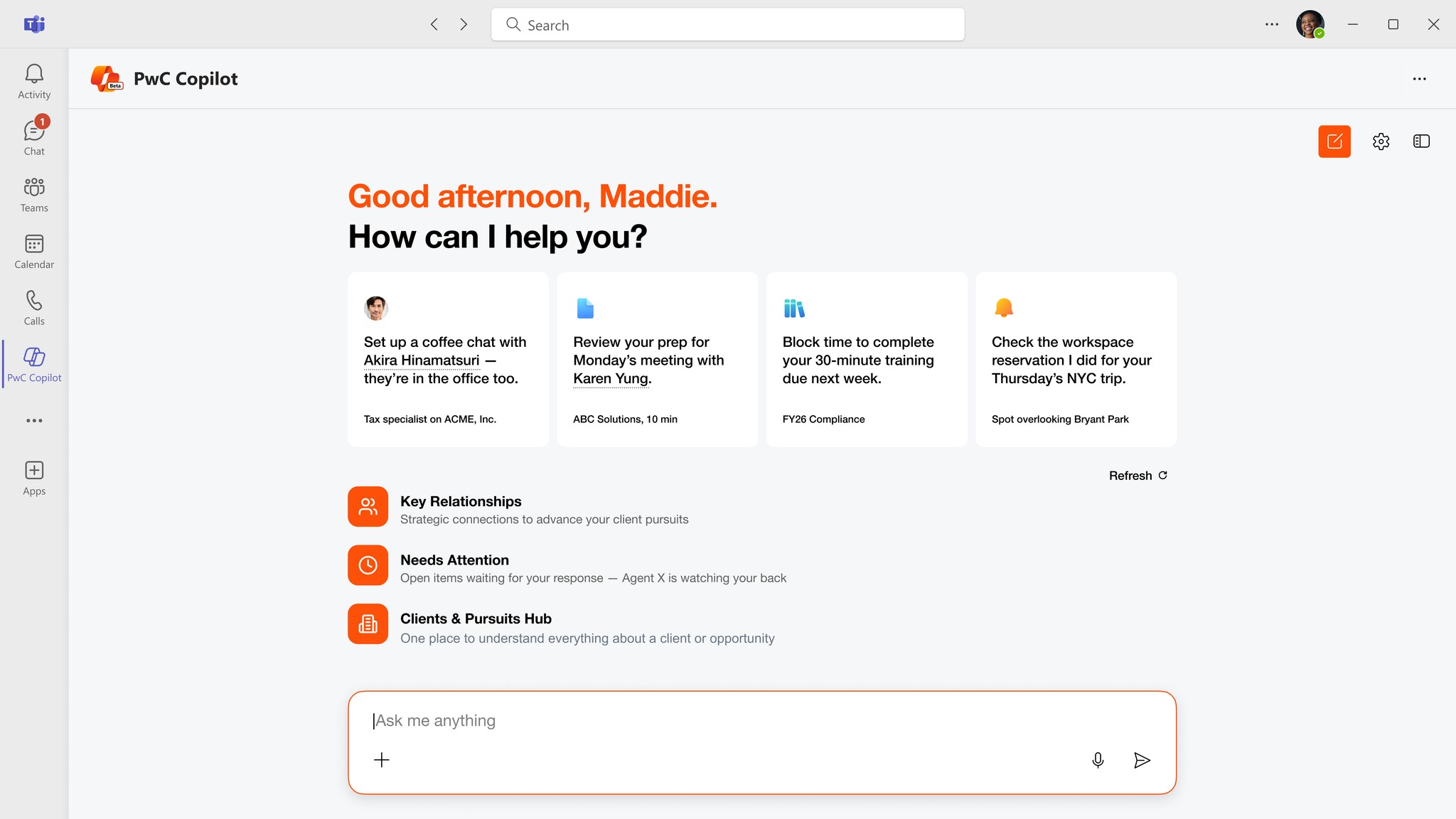
The same research theme shaped our assistant work: employees did not need more information, they needed help knowing what mattered now. I contributed across workflows that brought relationship, client, and work signals into context.
Relationships
Key Relationships
Turns scattered relationship data into a view of who matters, connection strength, and potential introduction paths without overwhelming users with the underlying data.

Prioritization
Needs Attention
Triages follow-ups, stale threads, and time-sensitive work with explainable urgency signals and AI-generated context. The ranking needed to be conservative because one bad recommendation could erode trust in the entire surface.

Working across the system
Shipping meant balancing users, policy, and platform constraints
I worked closely with product managers, engineers, governance and business stakeholders, and Microsoft as requirements changed underneath the product. Much of the design work was deciding where flexibility benefited the user and where consistency was necessary for security, approvals, global rollout, and implementation.
Outcomes
From early ecosystem to global platform
0 → 100+
AI capabilities added to the ecosystem
Global
Expanded from local → US → global rollout
+58%
Increase in active ecosystem usage
82%
Successful discovery → action rate
Reflection
What this taught me about AI products
AI adoption was not primarily a feature-discovery problem. It was a systems problem: people needed to understand what existed, what was relevant to them, what they could access, and when AI versus a person was the right source of help.
If I went back, I would invest earlier in longitudinal measurement across discovery, access, and repeat usage. Usability can be evaluated in a session; trust and adoption reveal themselves over time.